One-Stop PCB Factory: Prototype to Mass Production
For hardware startups and OEMs, getting high-quality PCBs quickly and reliably is critical. MC PCB is a one-stop contract PCB manufacturer supporting prototypes to volume builds—backed by experienced engineering support and rigorous QA.
MC PCB Co., Ltd.
Began in 2005
One-Stop PCB Factory: Prototype to Mass Production
For hardware startups and OEMs, getting high-quality PCBs quickly and reliably is critical. MC PCB is a one-stop contract PCB manufacturer supporting prototypes to volume builds—backed by experienced engineering support and rigorous QA.
MC PCB Co., Ltd.
Began in 2005
No. 2, Lane 11, Wenming Road, Fourth Industrial Zone, Nanzha, Humen Town, Dongguan City
What are the most common PCB design mistakes that cause manufacturing delays?
PCB builds stuck on CAM hold? See common design mistakes—stack-up gaps, over-tight rules, solder mask slips, and mismatched files—plus fixes to ship on time.
If you’ve ever sent a “clean” PCB design to a factory and still got stuck in CAM hold, you’re not alone. The board didn’t “fail.” It just hit a spot where the fab or SMT line can’t move forward without asking questions, rerunning checks, or waiting for missing info.
We build boards for OEMs, EMS teams, design houses, labs, and startups that need fast prototyping and stable volume runs. That’s the whole point of a China PCB B2B factory like ours: quick-turn prototypes, reliable assembly, tight QC, and on-time delivery worldwide. You can see the full service map on our homepage.
Below are the most common design-side mistakes that slow manufacturing down, plus what to do instead. The internal links in this article come from your PCB.json list.
Common PCB design mistakes that delay PCB manufacturing
Here’s the quick scan. If your project keeps slipping, this table usually tells you why.
Mistake (DFM/DFA keyword)
Where the delay happens
What the factory typically does
What you should send / change
Don’t involve the fabricator early
Quoting + CAM review
Puts job on hold, raises EQs
Share constraints early, align capabilities and targets
Over-spec’ing tight trace/space/via tolerances
CAM tooling + process planning
Routes to special process or rejects rules
Use standard capability unless performance truly demands more
Incomplete or unclear stack-up details
Stack-up approval + impedance setup
Stops for clarification, suggests a new build
Provide full stack-up with materials, copper, dielectric, impedance notes
Solder mask design errors
Solder mask film + SMT yield
Flags mask issues, risks rework
Keep mask clearances sane, avoid bad dams, tent vias when needed
Single revision set: Gerber/X2, drill, stack-up, fab notes
Ignore component lifecycle / availability
Purchasing + kitting
Pauses build, triggers BOM scrub
Check AVL, lifecycle, alternates, and packaging upfront
Now let’s break them down with real shop-floor scenarios.
Don’t involve the fabricator early
This one looks harmless, but it’s a repeat offender in NPI. You design to “what you’ve always used,” then you send files, then you wait. The fab comes back with an EQ list: “Can you confirm copper weight?” “Is this via tented?” “Do you really need this impedance tolerance?” That back-and-forth is pure schedule burn.
A practical way to avoid it: treat your fab like part of your engineering team. Share constraints before you lock the layout. If you’re doing a tougher build, route it through an advanced review early. Our Advanced PCB service is built for that kind of pre-check.
Where it shows up most
HDI fine-pitch boards with tight annular ring or microvia rules
Mixed-material stacks (RF + FR-4)
Rigid-flex with bend areas and stiffeners
Over-spec’ing tight trace/space/via tolerances
Design teams often “play it safe” by tightening rules. Ironically, that can slow you down more than it helps. If you spec ultra-tight trace/space or tiny drills without a real need, CAM has to push the job into a narrower process window. That can mean special tooling, extra coupons, extra inspection steps, or a capability review.
Think of it like ordering a custom part when a standard one works. The factory can do it, but the line won’t sprint.
Fix that actually works
Start with the fab’s standard capability, then tighten only the nets that need it
Keep via sizes and aspect ratios reasonable unless density forces your hand
Call out the true requirement (signal integrity or creepage), not a blanket “as small as possible”
If you’re not sure what’s standard, check our Capabilities page and align your rules to what’s realistic for your board class.
Incomplete or unclear stack-up details
A missing stack-up is like shipping a recipe without ingredient amounts. The board might still get built, but the fab can’t commit without guessing. That’s why stack-up ambiguity triggers delays fast.
This gets even more serious when you need impedance control. Without dielectric thickness, material type, copper weight, and target impedance, CAM can’t finalize the build. They stop, ask questions, then re-run calculations after you answer.
What to include in your stack-up package
Layer count and each layer name (L1, L2, etc.)
Copper weights per layer (not just “1 oz typical”)
Dielectric thicknesses and material family
Impedance targets and which nets need them
Any special notes: backdrill, via-in-pad, resin plug, filled vias
If you’re doing RF or high-speed, our PCB fabrication flow is set up to review stack-up and impedance notes early, so you don’t burn time after release.
Solder mask design errors
Solder mask mistakes don’t just cause defects. They also cause delays because the factory either needs you to approve changes or they need to rework a risky build plan.
Two common triggers:
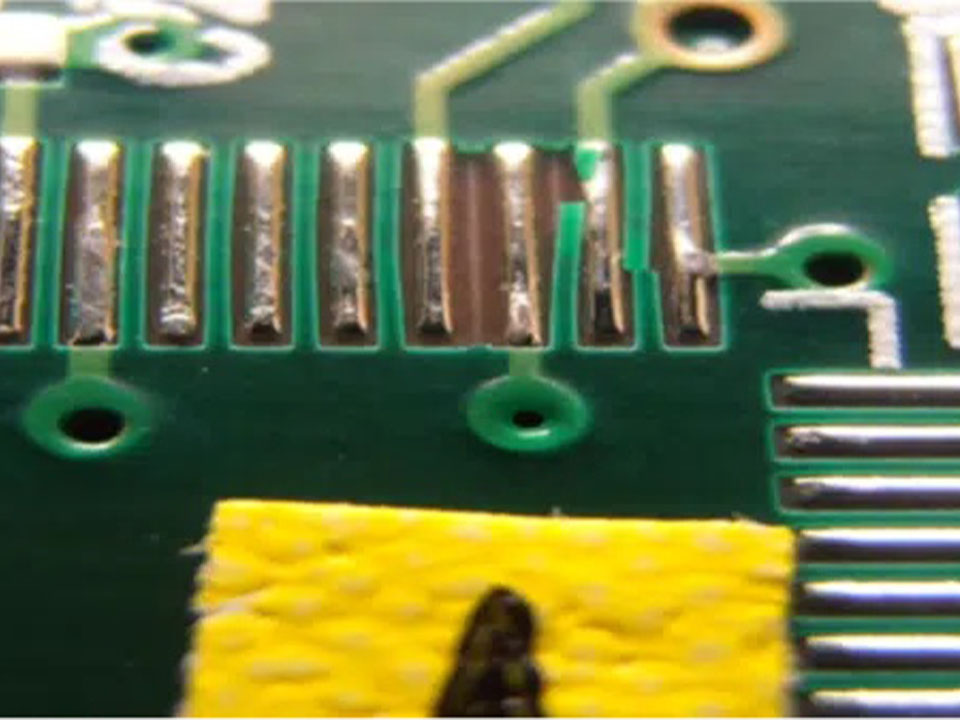
Mask slivers / weak dams between tight-pitch pads
Mask over pads because the opening is too small or misaligned
In fine-pitch footprints, a tiny mask issue can snowball into solder bridging, tombstoning, or ugly rework. Nobody wants that on a B2B run.
Quick DFM habits
Keep solder mask clearances consistent and manufacturable
Avoid giant “gang openings” unless you truly need them
For vias near pads, decide: tent, plug, or leave open, then document it
If your project needs assembly too, align mask rules with your assembler’s preferences. Our PCB assembly team sees mask-driven yield losses all the time, so we push these checks early.
Silkscreen problems
Silkscreen feels cosmetic until it breaks the line. When legend text lands on pads, blocks fiducials, or hides polarity marks, SMT setup slows down. Operators then do manual verification. AOI becomes less confident. Debug takes longer.
This is especially painful on:
Dense connector boards where pin-1 is hard to spot
High-mix production where setup time matters
Field-service products where technicians need readable labels
What good silkscreen does
Clear polarity and pin-1 marks
Reference designators that survive reflow
Legible text size and spacing
No legend on copper pads
If you want to see how we handle inspection and marking consistency, our Quality page explains the checkpoints that protect shipment dates.
Mechanical constraints aren’t defined clearly
Mechanical ambiguity creates classic “can’t ship it yet” moments. The fab might not know whether a slot needs plating, how tight the outline tolerance is, or where copper must keep away from a V-score. That’s how you end up with CAM questions, panel redesign, or a request for updated drawings.
Real-world example You design a control board that needs clean edges for a plastic housing. The outline includes tight corners, a few cutouts, and edge connectors. If you don’t specify depanel method, rail needs, and keepouts, the panel plan changes midstream. That’s delay plus risk.
What to define
Outline, slots, cutouts, and plating requirements
Edge connector bevel needs (if any)
V-score or mouse-bite preference
Copper-to-edge keepout rules
Panel rails, tooling holes, and fiducials if you want consistent assembly
For production-style builds, it helps to align these with the factory’s process from day one.
Manufacturing data package is inconsistent
This is the fastest path to a hard stop. If the drill chart doesn’t match the drill file, or layers don’t line up with fab notes, CAM can’t trust the dataset. They pause, then ask you to confirm which revision is “real.”
This usually happens after a late ECO:
You updated the PCB layout
You forgot to regenerate NC drill
Someone exported Gerbers from a different branch
The stack-up PDF doesn’t match the final constraints
Release checklist that prevents CAM hold
One revision label across Gerber, drill, drawings, stack-up, and notes
Include readme with layer mapping and finish requirements
Use consistent naming and avoid “final_final2” chaos
Verify drill units, tool sizes, and plated vs non-plated holes
If you’re sending your first build, our Services page shows the typical deliverables we expect for a clean release.
Ignore component lifecycle / availability
Sometimes the PCB is perfect, but the build still stalls because parts can’t be sourced. Obsolete parts, long lead-time passives, odd packaging, or missing alternates can pause kitting. Then the assembly slot slips, and your shipping date slips with it.
This hits B2B buyers hard because your customer often needs stable supply for OEM rollout or a maintenance batch.
BOM habits that keep the line moving
Check lifecycle status early
Use an AVL and list alternates for risk parts
Confirm package type (reel, tray, cut tape)
Watch for parts with strict date code or traceability needs
If you need a one-stop flow for prototypes through volume, our Products section shows board types we commonly support, including high-density and control boards.
Practical scenarios that match how delays really happen
Here are three patterns we see across OEM, EMS, and design teams:
Startup prototype sprint: Tight deadlines, fast ECOs. The biggest risk is an inconsistent data package and missing stack-up notes. If you’re doing quick-turn, start with a clean prototype flow like our PCB prototype manufacturing service.
Industrial control volume: The line hates ambiguity. Mechanical callouts, panel rules, and silkscreen clarity matter because rework kills throughput.
RF / high-speed board: Over-tight tolerances and vague impedance notes cause the most CAM churn. Build the stack-up first, then route the layout to match it.
A simple way to reduce manufacturing delays
You don’t need magic. You need fewer surprises.
Lock the stack-up before you route critical nets
Spec only what you truly need
Release one consistent file set
Run DFM + DFA as a habit, not a rescue step
If your design is tricky, involve the factory early
If you want your next build to move without the “CAM hold” email, use our Contact Us page and send your stack-up + Gerbers + BOM. We’ll tell you what will slow it down, and we’ll tell you how to fix it before it hits the line.
MC PCB.,Ltd, alongside Dongguan MaoChang Printed Circuit Board Limited,has focused on PCB manufacturing over 20 years. MaoChang Printed Circuit Board Limited, a professional PCB factory for Quick Turn PCB, Prototype PCB and High Mix Low Volume fabrication. With UL certification for Rigid FR-4 / High Frequency / Aluminum Based PCB production.
Company
About
Contact
Capabilities
Services
Application
Products
Quality
Blog
Products
Printed Circuit Boards
PCB Prototype
Flexible PCB
High Frequency PCB
Thick-Copper PCB
PCB Assembly
Metal core PCB
Thick-Copper PCB
Contact
0755-2889 4567
Room 1803, lA Building, Longwan, Nanhuai Road, Shajing, Bao'an District,Shenzhen City
No. 2, Lane 11, Wenming Road, Fourth Industrial Zone, Nanzha, Humen Town, Dongguan City